If you upgraded your servers to version 2025 and your scheduler or LDAP connection started failing with an “Invalid Bind Account DN or Password” error even though the password is correct, the cause is usually that the server now requires a more secure way to sign in (for example, SSL/TLS or signing).
What you might see in the logs: Errors mentioning that the server requires stronger authentication (signing or channel binding), such as SSL/TLS (LDAPS). For example:
ERROR ... LDAPConnectionHandler - [LDAP: error code 8 - 00002028: LdapErr: DSID-0C090343, comment: The server requires binds to turn on signing before performing bind operations, data 0, v65f4]
javax.naming.AuthenticationNotSupportedException: [LDAP: error code 8 - 00002028: LdapErr: DSID-0C090343, comment: The server requires that LDAP signing be active on the connection, data 0, v65f4]
What you can do (temporary fix): Ease the requirement on the domain controller by changing these Windows security settings:
Go to Computer Configuration > Policies > Windows Settings > Security Settings > Local Policies > Security Options and set:
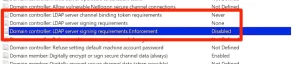
After saving these settings, run gpupdate/force
so the new policy applies. This should restore the bind account connection. Documentation will be updated to include these settings.


